A description (caption) is the text that gets posted alongside a video or carousel on TikTok. In Clout Uploader, its source is configured in the template via the Set Description toggle plus a choice of one of four sources: Inline text, Text file (.txt), JSON file, or Sidecar files.
This guide covers all four options: when to use each, how to format the files, how the app picks variants, and what to do when something goes wrong.
Turning it on
Each template has a Set Description toggle:
- Off → the app leaves the TikTok caption field empty.
- On → you must pick a description source.

Once enabled, you'll see four sources: Text, TXT file, JSON file, Sidecar files. Each is covered below.
📦 Ready-made example templates are downloadable directly from the app: on the templates page, there's a "Download example" link next to each field. The files live in
webapp/static/examples/:
descriptions.example.txtcontent.example.jsonsidecar.example.json
Option 1. Inline text — multiple captions separated by ;
When to use
When you have a handful of short captions and don't want to maintain a separate file.
What to set in the UI
- Source → Text
- Descriptions field — all variants on one line, separated by semicolons
;
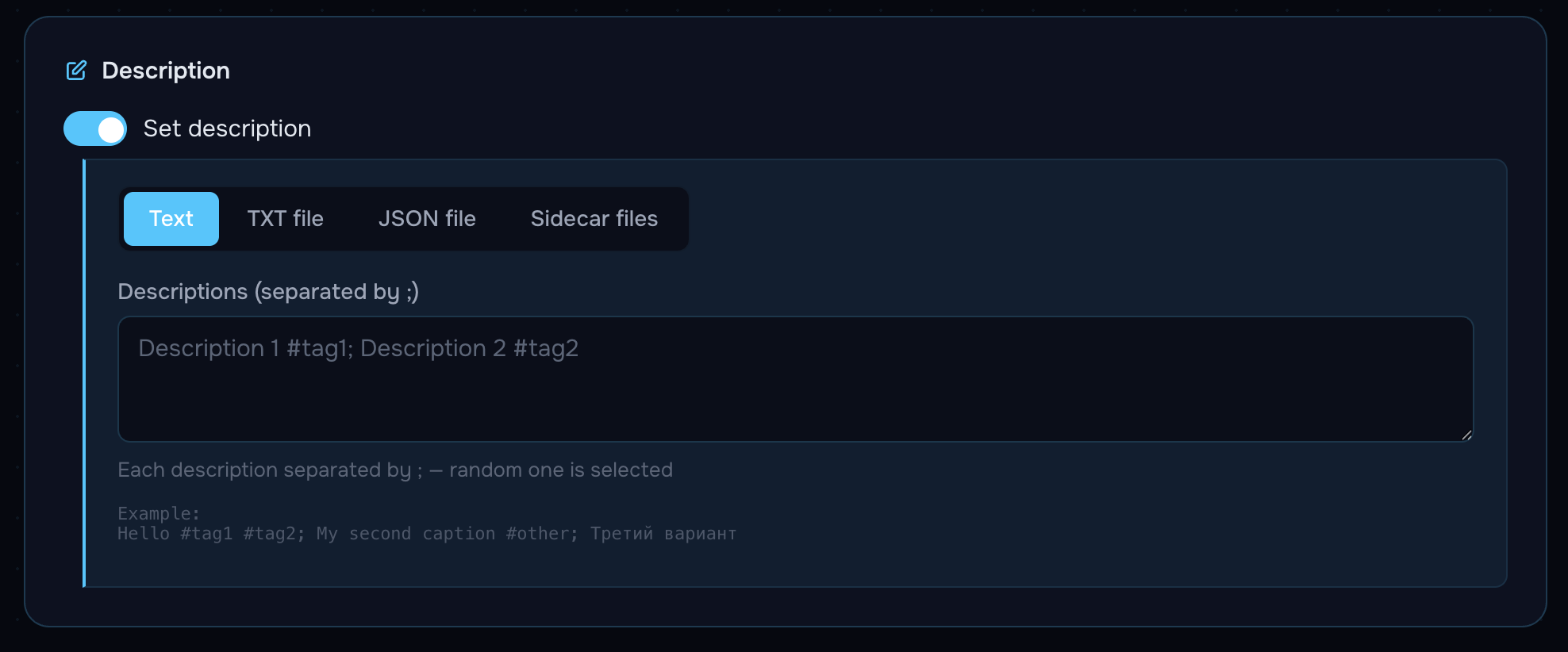
Example
First caption #tag1; Second caption with emoji 🎬; Third caption @mention #hotHow variants are picked
Random without repeats: the app cycles variants randomly, marking each as used. Once all variants are exhausted, the cycle restarts.
Pitfalls
- If your text contains a literal
;, it will be treated as a separator. Move the description to an external.txtor sidecar. - Empty blocks between
;;are ignored.
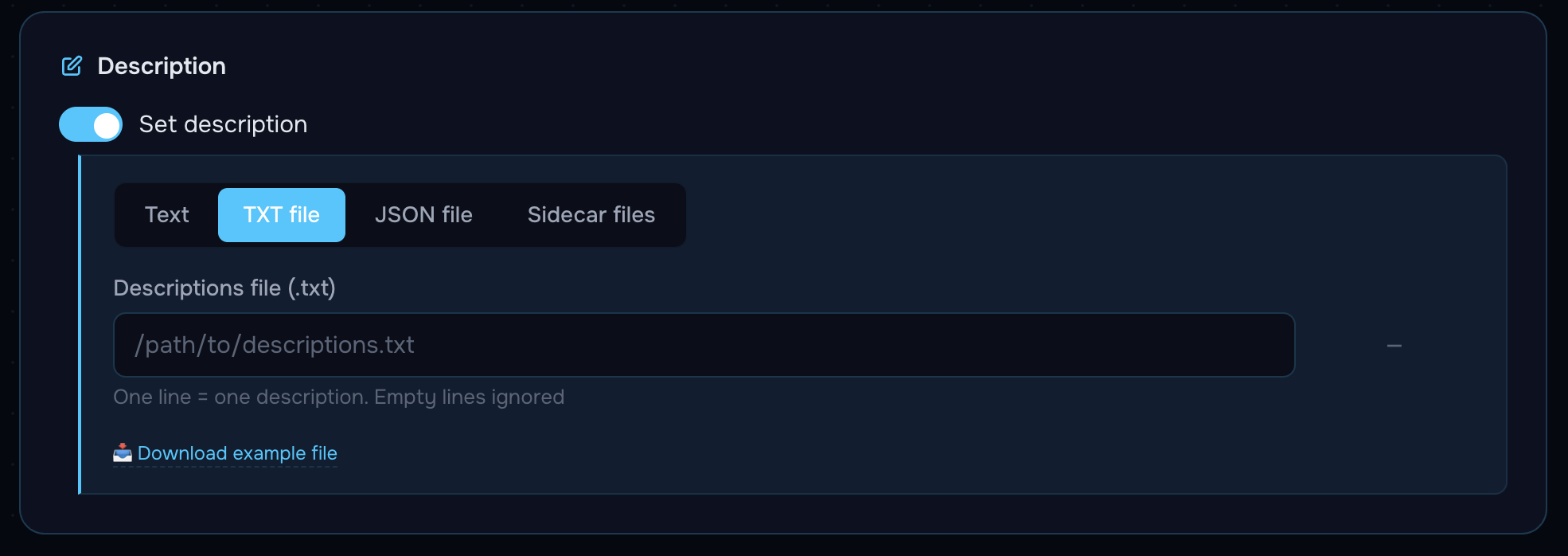
Option 2. Text file — .txt, one caption per line
When to use
When you have 10+ descriptions and prefer to keep them in an external file editable in any text editor.
What to set in the UI
- Source → TXT file
- Descriptions file (.txt) — absolute path to a
.txt(only that extension; others are ignored)
File format
- Encoding: UTF-8 (BOM supported)
- Line endings: LF or CRLF — both fine (normalized)
- One line = one caption
- Empty lines are ignored
- Hashtags and emoji go inline — there are no separate fields
Example (descriptions.example.txt)
Put your caption here — replace this line with your own text
Add hashtags inline like this #example #replace_me
Emojis work too 🎬 — drop them anywhere in the caption
Each line in this file becomes one TikTok caption
Empty lines are ignored, max 2200 characters per caption
How variants are picked
Random without repeats — same as inline text.
Pitfalls
- The extension must be
.txtonly..text,.md,.csvwon't work. - Don't use
#for comments — a line starting with#will be posted to TikTok as a caption with a hashtag.
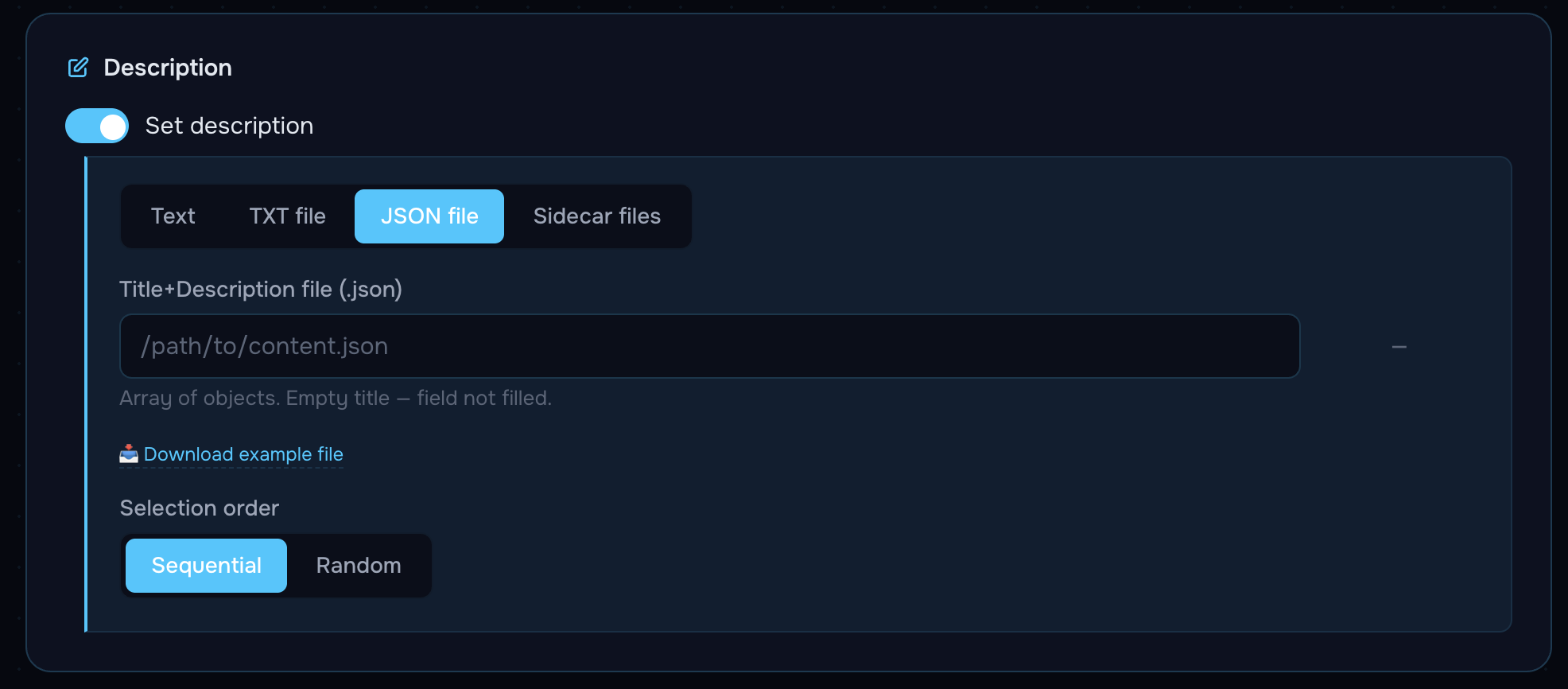
Option 3. JSON file — {title, description} per post
When to use
- When carousels need separate titles (the Title field in TikTok).
- When you need sequential ordering (not just random).
- When you want structured content storage (for scripts, generators, AI pipelines).
What to set in the UI
- Source → JSON file
- Title+Description file (.json) — absolute path to a
.json - Selection order:
- Sequential — items used in order: first, second, third…
- Random — random without repeats
File format
The root is an array; each element is an object with two fields:
[
  { "title": "...", "description": "..." },
  { "title": "...", "description": "..." }
]
Fields:
description— required caption text (≤ 2200 characters).title— optional.- For videos, TikTok has no title — the
titlefield is ignored. - For carousels, the title is filled in if non-empty. If
title: ""or the field is missing, the Title field in TikTok is left untouched.
- For videos, TikTok has no title — the
- Any other keys (e.g.
_comment) are ignored by the parser — you can keep comments inline in the file.
Example (content.example.json)
[
  {
    "_comment": "This key is ignored by the parser",
    "title": "Put your title here",
    "description": "Put your description here — replace this with your TikTok caption #hashtag"
  },
  {
    "title": "",
    "description": "Leave title empty if you don't want one — only the description will be set"
  },
  {
    "title": "Add hashtags inline",
    "description": "Hashtags go inside the description, not a separate field 🎯 #example #replace"
  },
  {
    "title": "Emojis work fine",
    "description": "Emojis 🎬 ✨ 🚀 are supported in both title and description"
  }
]
Pitfalls
- The JSON must be valid. Any syntax error and the app falls back to legacy sources (the txt file or inline text, if defined).
- An empty array
[]→ no descriptions → falls back to legacy. - Encoding must be UTF-8.
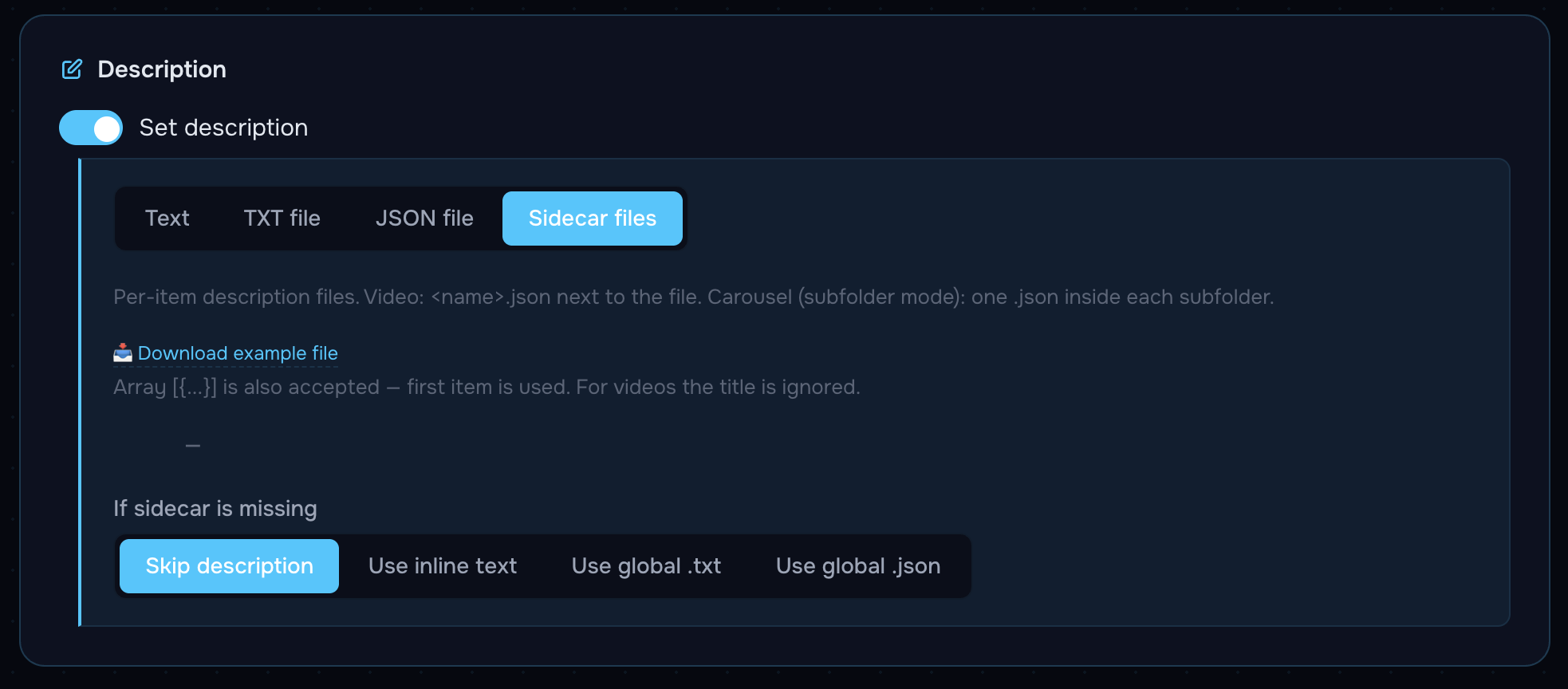
Option 4. Sidecar — a separate .json next to each media file
When to use
- When each video or carousel has its own unique caption, and a strict "this text → this file" binding matters.
- When content is prepared by a pipeline (generator / editor) that drops the caption into a separate file alongside the media.
- In Seeding mode, to avoid mixing up which caption belongs to which clip.
What to set in the UI
- Source → Sidecar files
- If sidecar is missing — what to do when a given file has no sidecar:
- Skip description (default) — leave the TikTok caption empty
- Use inline text — pull from the global Descriptions field
- Use global .txt — pull from the global
.txt - Use global .json — pull from the global
.json
Sidecar file format
An object with two fields (recommended form):
{
  "title": "Put your title here",
  "description": "Put your description here — replace this with your TikTok caption #hashtag"
}
An "array" form is also accepted (for backwards compatibility — the first element is used):
[
  {"title": "...", "description": "..."}
]
Where to put the sidecar
Video
A <video_filename>.json file in the same folder next to the video:
videos/
├── clip_1.mp4
├── clip_1.json          ← caption for clip_1.mp4
├── clip_2.mov
├── clip_2.json          ← caption for clip_2.mov
└── clip_3.mp4           ← no sidecar — fallback kicks in
For videos,
titleis always ignored — TikTok doesn't display a title for videos.
Carousel — subfolder mode (supported)
The sidecar lives inside the carousel subfolder. The filename is picked by priority (case-insensitive):
content.jsondescription.jsoncaption.json- Any first
*.json(natural sort)
carousels/
├── 01_summer/
│   ├── 1.jpg
│   ├── 2.jpg
│   ├── 3.jpg
│   └── content.json          ← priority 1
├── 02_promo/
│   ├── photo_a.png
│   ├── photo_b.png
│   └── description.json      ← priority 2
└── 03_lifestyle/
    ├── img1.png
    └── caption.json          ← priority 3
If a subfolder contains multiple .json files, none of which match the priority list, a WARNING is logged and the first file by sort order is used. Don't introduce ambiguity — name your file using one of the priority names.
Carousel — flat mode (NOT supported)
Sidecar in flat carousel mode does not work — there's no unambiguous way to bind photos to a group. If you need individual captions, switch to subfolder mode.
Sidecar example (sidecar.example.json)
{
  "_comment": "Save next to your media. For a VIDEO: rename to .json (e.g. clip1.mp4 → clip1.json) in the same folder. For a CAROUSEL: rename to content.json (or description.json / caption.json) and put it INSIDE the carousel subfolder. 'title' is optional and ignored for videos. 'description' is capped at 2200 chars. The _comment key is ignored by the parser.",
  "title": "Put your title here",
  "description": "Put your description here — replace this with your TikTok caption #hashtag"
}
What happens to the sidecar after publishing
- Video:
<name>.jsonmoves toused/(or is deleted) together with the video, in sync. - Carousel in subfolders: the entire subfolder moves to
used/as a unit — the sidecar inside goes along automatically.
Hashtags, mentions, titles, music — where to set them
| What | Where | Comment |
|---|---|---|
| Hashtags | Right inside the description text | No separate field: "My caption #travel #2026" |
| Mentions @user | Right inside the description text | The parser catches the popup suggestions while typing |
| Title | Only in JSON / sidecar, title field | Ignored for videos. Filled in for carousels if non-empty |
| Music | Separate Music card in the template | Not part of the description, configured separately |
| Multiple languages | Inside the text | Any Unicode is supported (Cyrillic, emoji) |
Limits and normalization
- Maximum 2200 characters per caption (TikTok hard cap).
- If the caption is longer, the app truncates to 2200 and logs a WARNING.
- BOM (
) at the start of a file is stripped automatically. - Line endings are normalized (
\r\n→\n,\r→\n). - Leading and trailing whitespace is trimmed.
Troubleshooting
| Symptom | Cause | Solution |
|---|---|---|
| Empty caption posted on TikTok | Sidecar missing, fallback = Skip | Add a sidecar or change fallback to inline / .txt / .json |
| Same text gets posted in a loop | Few inline variants → exhausted quickly → cycle restarts | Add more variants via ; or switch to .txt / .json |
| Title didn't appear on a carousel | title empty or missing | Add a non-empty "title" in JSON / sidecar |
| Title didn't appear on a video | That's expected — videos on TikTok have no Title | Move important text into description |
| WARNING "Multiple non-priority sidecars" | Several .json in a carousel subfolder, none priority | Rename the right one to content.json |
| Caption truncated | Longer than 2200 characters | Shorten or trim filler |
| JSON not parsing | Broken syntax or non-UTF-8 | Run through a JSON validator, check encoding |
| Sidecar not picked up on the fly | Cache populated at thread start | Restart the thread |
Cheat sheet: which source to pick
                    ┌─ One-or-two variants for all posts   → Inline text
                    │
same captions       ├─ 10+ simple captions, no titles      → Text file (.txt)
across all clips ───┤
                    └─ Need titles, need Sequential        → JSON file


unique caption ──→ Sidecar (video: <name>.json,
per file                     carousel: content.json in subfolder)
Where to download example templates
In the app, on the templates page, there's a "Download example" link next to each field. They also live in the repo:
webapp/static/examples/descriptions.example.txt—.txtexamplewebapp/static/examples/content.example.json— global.jsonexamplewebapp/static/examples/sidecar.example.json— sidecar example
Grab a file, replace the text inside with your own, and either save it next to the media (for sidecar) or point the Title+Description file / Descriptions file field at it (for global sources).